Bottom line
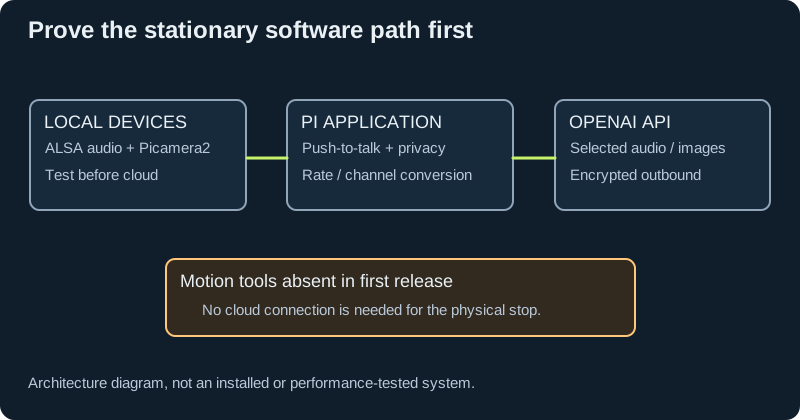
Keep the reported-owned CanaKit Raspberry Pi 5 8 GB / 128 GB kit. For MORLOK's first useful release, the Pi is an audio/camera/network computer; the large conversational and vision models run in the cloud. A small, modular Python application is the best starting point. Preserve the independent Pico controller and physical drive-stop architecture. Add Home Assistant integration as an optional adapter; add ROS 2 only when mapping/navigation or a substantial ROS sensor ecosystem creates a concrete need.
This is an engineering recommendation from the workload split, not a benchmark of the actual kit. No inventory, installation, flashing, live API call, physical test, new authentication, purchase or performance measurement was performed. Existing project safety and drivetrain gates remain intact.
The MP1 mission is sound: make a reliable stationary robot that hears, speaks and answers questions about requested images before making it move. Spending the first phase on ROS, a new SBC, local large-model inference, or a custom Mac interface would delay that result without establishing a current need.
1. Responsibilities and boundaries
| Layer | Proposed responsibilities | Excluded responsibilities |
|---|---|---|
| Cloud AI | Conversation, requested image interpretation, high-level suggestions and approved tool requests | Direct PWM/GPIO, arming, changing physical limits, determining collision clearance |
| Pi interaction service | Push-to-talk, USB audio, camera capture, rate conversion, cloud-session lifecycle, local status, privacy gating | Hard-real-time motor loop or independent drive-stop guarantee |
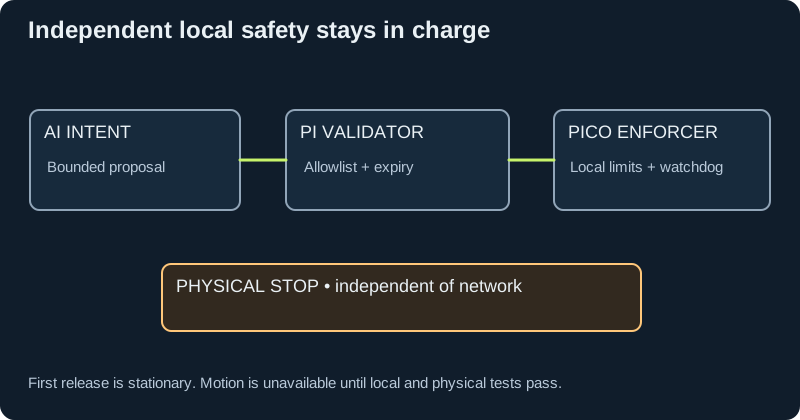
| Pi application gateway | Validate explicit schemas, authorization, current mode, freshness, capability availability; correlate requests with real results | Accepting arbitrary code/shell, unrestricted destinations or raw device access from a model |
| Pico motion controller | Existing deterministic loop, encoder sampling, bounded motor control, local interlock/arm checks, expiry and watchdog behavior | Depending on Wi-Fi, Home Assistant, the Mac, speech recognition or cloud uptime |
| Physical stop/protection | Reviewed independent drive-energy and protection behavior | Assuming zero PWM, MCU reset or battery disconnection resolves stopping/regeneration by itself |
| Optional HA/ESPHome | Home-device integration, dashboard, noncritical distributed sensors and indicators | Motor safety timing, network-based remote arming or stale-command replay |
| Optional Mac/iPhone app | Display actual state; deliberate local supervision/configuration where separately authorized | Becoming required for the robot to stop safely |
The Pi gateway must be authoritative even if tools are exposed through several frontends. A Home Assistant action, Swift app request or MCP call must enter the same constrained gateway. First release has no motion tool at all.
For a later qualified motion release, retain a versioned local protocol with explicit units, bounded payload lengths, sequence/duplicate detection, session/boot epoch, short command lifetime, configuration identity and structured rejection reasons. Prefer monotonic local deadlines; do not trust a remote wall-clock timestamp alone. Clear motion authority on disconnect, session change, reset, fault or configuration mismatch. Reconnection must require deliberate local re-arming. An acknowledgement means receipt/acceptance, not successful physical completion; completion reports need controller/sensor evidence. These are design recommendations to reconcile with existing firmware, not a replacement firmware specification.
2. Linux installation plan
Recommended OS and dependency strategy
For a fresh appliance image, select Raspberry Pi OS Lite 64-bit, currently based on Debian Trixie. A working Desktop image is also reasonable during bring-up; it need not be erased merely to remove its desktop. Identify and back up the existing card first. Raspberry Pi recommends a clean image rather than an in-place major-version transition. Routine stable kernel/firmware updates come through APT; experimental rpi-update is not the default. Use the distribution's Python, APT for hardware-bound libraries, and a project virtual environment for application dependencies. Picamera2's environment may use --system-site-packages to see the distribution camera bindings. Do not use sudo pip or --break-system-packages. Raspberry Pi OS
Exact package versions must be recorded from the real image at installation time, then locked into the tested release manifest. A web documentation version is not proof that the robot has that version or that every dependency combination works.
Planned sequence, after separate implementation approval
| Stage | Proposed software and work | Required output before proceeding |
|---|---|---|
| S0: preserve and identify | Record OS image, architecture, kernel, boot firmware, Python, storage health, USB identities, camera identity and existing controller source; preserve a restorable card image | Inventory and rollback record; traction physically disconnected |
| S1: base OS | Supported 64-bit image; stable APT updates; correct locale/time/network; Git, distribution Python and venv support | Three repeatable cold boots; correct time/TLS; no unexpected capture or motion |
| S2: local camera | Distribution rpicam-apps and python3-picamera2; headless install without unnecessary GUI dependencies | Camera discovery and local requested snapshot; autofocus/shutter/cable behavior recorded |
| S3: local audio | Linux USB audio/ALSA; alsa-utils; optional PortAudio plus Python sounddevice; one chosen capture/playback owner | Exact supported formats/channels/rates, clean local record/playback, privacy-disconnect behavior |
| S4: local application skeleton | Python asyncio, bounded queues, explicit device adapters, structured configuration, schema validation, pySerial transport adapter and simulated devices | Offline tests; no cloud credential needed for local hardware/simulator work |
| S5: separately authorized API setup and trial | Current official OpenAI SDK or documented WebSocket client, pinned after compatibility testing; protected credential destination | Bounded voice and requested-image trials, actual usage, explicit account/access/retention review |
| S6: appliance operation | Non-root systemd-managed services, limited device permissions, structured rotating logs, restart policy and health reporting | Restart/network/device-loss tests; restart returns to privacy-safe and disarmed state |
| S7: later adapters | HA/MQTT or authenticated local dashboard first; Swift/MCP/ROS only when needed | No adapter can bypass the gateway; least-privilege access reviewed |
| S8: motion qualification | Reconcile driver backend, pins, encoder branch and independent protection; preserve G06–G09 | Existing controlled electrical/mechanical test evidence, not merely successful software execution |
This is an install sequence, not a command script to execute on an unidentified card. Resolve package names against the selected image and avoid copying root/privileged example deployments wholesale.
Use modern rpicam-*/Picamera2 rather than old raspistill, raspivid or legacy Picamera tutorials. Raspberry Pi supplies Picamera2 through APT, including a no-GUI option. Keep its libcamera stack together instead of replacing portions with arbitrary pip builds. Camera software
Python asyncio is appropriate for network/session orchestration and bounded I/O, not a guarantee of motor-loop scheduling. Keep blocking audio/camera/serial work off the event loop through supported callbacks, worker execution or separate processes. Python asyncio
3. Reusable open-source components
- Camera: Raspberry Pi's libcamera, rpicam-apps and Picamera2. This is the most direct route for Camera Module 3 on Pi OS.
- Audio: Linux USB audio/ALSA, with
sounddevice/PortAudio if a Python stream API is useful. Its raw stream classes can avoid unnecessary array dependencies. Linux may need the distribution PortAudio runtime package. sounddevice installation - Buttons and indicators on Pi: GPIO Zero using its
lgpiobackend. Current GPIO Zero documentation explicitly distinguishes Pi 5 support; old RPi.GPIO/pigpio examples are not an assumed drop-in. Keep safety-critical inputs on the independently qualified controller. GPIO Zero pin backends - Local controller link: pySerial can provide the transport, but message framing, timeout, duplicate handling, freshness and safe state remain MORLOK responsibilities. pySerial
- Pico: the official C/C++ SDK supplies hardware APIs, including the hardware facilities needed for GPIO, timers, PWM and watchdog work; the Pico examples include a PIO quadrature decoder. Reuse reviewed parts, not an unqualified robot firmware image. Preserve existing Bench 3.1 until its actual language/toolchain and driver assumptions are reconciled. Pico SDK, quadrature example
- Additional sensors: choose the official/manufacturer library only after identifying the exact sensor, bus voltage and address. A library name does not establish connector polarity, 3.3 V compatibility, partial-power safety, range quality or suitability as a collision sensor.
Audio compatibility catch
Seeed documents the reSpeaker Lite USB interface as UAC2 and 16 kHz. The official firmware repository currently lists USB v2.0.7 and still labels USB 48 kHz firmware as TODO. USB and I2S firmware are different branches; an ESPHome/XIAO I2S example is not the Pi USB installation recipe. Inspect the received board/firmware before considering a separately authorized update. The repository says USB firmware supports simultaneous recording/playback. Seeed Lite documentation, official firmware repository
OpenAI's current PCM examples use 24 kHz. MORLOK therefore needs an explicit, tested audio-format boundary: identify the actual USB formats, choose the intended microphone channel, convert sample rate/encoding correctly, and convert playback to the device's supported format. Never relabel 16 kHz bytes as 24 kHz. Route output through the intended echo-reference path. Test fan/speaker enclosure behavior before enabling full duplex. OpenAI WebSockets
4. Lightweight Python versus ROS 2
| Choice | Strength | Added cost and risk | Recommendation |
|---|---|---|---|
| Python service plus existing Pico protocol | Short path to voice/vision, explicit privacy/session lifecycle, easy local tests, limited components | MORLOK must own a small protocol and device abstraction | Use now |
| ROS 2 on Pi with serial gateway to Pico | Standard messages, transforms, odometry, visualization, logging and broad sensor/navigation ecosystem | Linux/distro pairing, package compatibility, DDS/network configuration, more operational surface | Introduce when a specific robotics capability needs it |
| ROS 2 plus micro-ROS on Pico | ROS-style MCU messages and integration | Agent dependency, MCU memory/executor/toolchain constraints, firmware rewrite/requalification | Optional later; not necessary to benefit from ROS |
ROS 2 diff_drive_controller already converts body velocity to wheel commands and provides feedback-based odometry, limits and command-timeout behavior. That is valuable reuse. It does not establish an independent stop, solve electrical braking energy, or make Linux scheduling safety-rated. MORLOK still needs an exact hardware interface and calibrated wheel/encoder geometry. ros2_control differential drive
A practical migration avoids rewriting the Pico first: keep the qualified controller protocol and add a ROS hardware/gateway adapter on the Pi. Treat the controller's independent limits as final authority. Mapping/navigation remains a later scope needing suitable sensors, geometry/transforms and physical tests.
Current version choices
- Raspberry Pi OS Trixie is the present Pi-native baseline; it is not the same distribution as Ubuntu.
- ROS 2 Jazzy plus Ubuntu 24.04 arm64 is a conservative Tier 1 binary-supported combination, supported through May 2029. Do not paste Ubuntu ROS repository instructions into Pi OS Debian. Jazzy platform matrix, Jazzy installation source
- ROS 2 Lyrical is the newer May 2026 LTS, supported through May 2031; its Tier 1 Ubuntu target is 26.04 arm64. Debian Trixie is Tier 3/source-built. Evaluate Lyrical when the actual selected drivers are available and tested; do not claim Jazzy is the newest or make an untested newest-version migration compulsory. Lyrical release, Lyrical platforms
- The micro-ROS Pico SDK integration has a Jazzy branch. Its documentation requires compatible compiler/prebuilt-library versions, a host micro-ROS Agent, and explicitly warns that it is not production-ready for a specific use case. Never interpret available code as qualified safety firmware. micro-ROS Pico Jazzy
Use a separate boot image or carefully controlled container experiment for ROS evaluation. Containers do not remove camera, device-permission, scheduling or safety constraints. Do not make ROS adoption a prerequisite for the first conversation.
5. Home Assistant and ESPHome are still viable
The earlier idea was directionally useful, provided the responsibilities are separated.
Use ESPHome for noncritical ambient sensors, status lights and convenient home-device integration. Its native API supports direct Home Assistant communication and optional encryption; the documented Python client is aioesphomeapi. Account for its default API reboot timeout of 15 minutes without a client and finite send queues when designing offline behavior. These are home-automation behaviors, not a motor watchdog contract. ESPHome native API
For MORLOK-to-HA telemetry, MQTT is an optional established integration route. Use authenticated access, topic permissions, availability and timestamps. State may be retained where appropriate; motion requests must not be retained or replayed. Do not install a broker merely because it is popular if a direct local adapter already solves the need. Home Assistant MQTT
Home Assistant's OpenAI integration is a legitimate alternative for a home-assistant-centered voice product: it can expose only selected entities to the AI and currently provides conversation, AI-task, speech-to-text and text-to-speech subentries. It is not evidence of a drop-in MORLOK Realtime/full-duplex camera application. Start with read-only household information; approve specific home actions separately. Home Assistant OpenAI
Prefer an existing stationary HA host if one exists. Do not assume the owner already operates or operates one. If a future co-located experiment is desired, Home Assistant Container can run on managed Linux, but its ecosystem applications are not included as they are with Home Assistant OS. HA OS is a purpose-built appliance; making it the robot's base OS complicates the independent custom Linux application. A mobile robot that leaves home Wi-Fi or loses battery power should not become the home's essential automation hub. HA installation choices
6. OpenAI interface choice
Current official guidance starts new conversational voice applications with GPT-Live. It supports conversation while backend work continues. Realtime remains appropriate when its explicit turn/session/tool model is wanted. Their event formats, credential flows and startup contracts differ even when both use WebSockets. Audio architecture guide
For MP1, retain a controlled Realtime push-to-talk prototype as a deliberate engineering choice, while scheduling a bounded comparison with GPT-Live after local audio succeeds. GPT-Realtime-2.1 currently lists image input, audio input/output and function calling; it does not list video support. A requested camera frame is an image, not continuous visual awareness or navigation evidence. Realtime model, conversation lifecycle
GPT-Live's audio frontend does not accept images directly. Images go to a vision-capable backend and concise findings return to the conversation. Keep camera freshness, consent and capture state under local application control. GPT-Live visual delegation
Use application-owned function tools for MORLOK's constrained local actions. OpenAI explicitly distinguishes this from API-executed remote MCP tools. Maintain local approval/schema/state checks regardless of model phrasing; model-provided text and camera-observed text are untrusted inputs. Realtime tools
API credentials, account/model availability and a spending cap are implementation prerequisites still to resolve. Log actual session/backend usage and distinguish incomplete finalization from a verified total. Do not promise a monthly cost or cents-per-minute figure from a model label. No new credentials or permissions were established by this research.
7. Mac, Swift, plugin and connector options
A native SwiftUI Mac companion is technically reasonable after a stable Pi API exists. Use a versioned authenticated HTTPS/WebSocket interface to display status, diagnostics and an explicitly requested local camera preview. Apple provides URLSessionWebSocketTask for asynchronous WebSocket messages. Keep the Mac replaceable and allow it to sleep or disconnect without affecting safe stopping. A small web dashboard is usually the faster first interface. Apple WebSocket API
A MORLOK MCP server could later expose narrowly scoped tools such as status and approved sensor reads through a ChatGPT/Codex plugin. Each tool needs explicit schemas and server-side authorization; metadata alone is not access control. This is an additional client of the same gateway, not a substitute for the embedded voice runtime or an automatic connection to this conversation's memory. OpenAI MCP server guide
Current Secure MCP Tunnel documentation provides an outbound-only private-network option for supported OpenAI surfaces. It requires a runtime key, tunnel identity and separate Platform/workspace permissions. Treat availability for the actual account, native binary compatibility and the security setup as unverified. Do not port-forward the robot or create persistent access as part of this plan. The simplest first release needs no remote MCP server: the Pi can execute application-owned tools locally. Secure MCP Tunnel
8. Is there a better board?
The Pi 5 offers the relevant CPU, CSI, USB and networking interfaces for the proposed cloud-assisted workload. Its suitability remains subject to testing with simultaneous audio, camera, encryption, UI and logging. Eight gigabytes is not a promise that arbitrary local models will run quickly, and a higher RAM number does not by itself increase per-token inference speed. Pi 5 specifications
Potential later branches:
- Pi 5 CPU-only local models: evaluate a named model, quantization, context length and task; measure latency, memory, accuracy and thermals. Preserve Vosk/Ollama ideas as experiments, not verified offline capability.
- Pi 5 plus AI HAT+ 2: now a genuine option for supported local LLM/VLM workloads. Older AI HAT+ products are primarily vision accelerators; the newer Hailo-10H product adds generative support. It does not run arbitrary OpenAI cloud models locally. Supported-model coverage, power, mounting, cooling and package compatibility still govern. AI HAT variants
- Accelerator software must match its hardware: Raspberry Pi documents distinct
hailo-allandhailo-h10-allpackage families that cannot coexist. Do not install speculative accelerators/drivers now. AI software - Jetson Orin Nano-class hardware: a credible CUDA-oriented local AI alternative if a named workload requires it. It brings a different software/power/thermal/carrier integration task; vendor Super modes can require higher power and thermal provisions. An advertised TOPS value is not a MORLOK conversation benchmark. NVIDIA Jetson FAQ
- Existing Mac or another computer as a local inference server: potentially useful for experiments, but actual machine/model capabilities are unknown and network/sleep dependency must be explicit. Never move the safety loop there.
Upgrade only after a reproducible bottleneck is shown and the candidate improves the same workload within measured power, cooling, mass and reliability limits. Do not add a speculative purchase bundle.
9. Future-proofing changes worth making now
These preserve options without buying extra computing hardware:
- Reserve physical access to the Pi PCIe connector, cooler, USB ports, SD card and CSI ribbon path. Keep a replaceable compute tray and cable service loops. A future accelerator/storage board must be checked for PCIe, stack-height and thermal conflicts; an empty volume is not a qualified payload allowance.
- Separate replaceable adapters for camera, audio, AI provider, home integration and controller transport. Keep application intents independent of API event names and ROS messages. Adapter replacement still requires tests; it is not just an endpoint rename.
- Establish an immutable hardware/configuration manifest: exact motor branch, counts/revolution, wheel geometry, pin map, driver type, firmware hash, device identities and limits. A wrong branch is a configuration fault, not something the AI can infer around.
- Keep one owner for each physical resource. Avoid competing camera/audio services; bounded buffers and cancellation must work across all adapters.
- Define a status vocabulary with actual timestamps and availability. Distinguish offline, listening, speaking, privacy-disabled, sensor unavailable and drive fault. Never display a synthetic successful measurement.
- Put hard software limits and local mode authorization outside the model. Give read-only integrations no path to arm, flash firmware, change limits or alter privacy configuration.
- Preserve a reproducible image, dependency lock, calibration record and rollback procedure. Trial updates while disarmed and supervised. Do not auto-update or flash during motion.
- Keep diagnostic data useful but minimal: durations, device health, request IDs and rejection reasons by default. Raw household audio/images and transcripts are opt-in retention decisions.
Power and cooling detail that affects software reliability
Pi 5 normally allows 1.6 A total downstream USB current when a suitable 5 V/5 A supply is detected, versus 600 mA with a 3 A supply; the fan header shares that peripheral budget. The audio board, speaker amplifier peaks and other USB devices must be measured together. A 5 W speaker label is neither its normal draw nor a USB budget measurement. Do not bypass current detection or add alternate audio power paths merely to hide an undervoltage problem; alternate paths also change the physical privacy design. Pi power and USB documentation
10. Verification and release evidence
All following physical tests remain NOT RUN. Suggested acceptance criteria require agreement before testing.
- Repeated cold boot: stable device selection, explicit firmware/configuration identity, no capture/cloud session/motor arm by default.
- Local media: recorded actual sample formats; no speed/pitch error from conversion; intelligible speech and requested camera snapshots; no self-triggering at intended volume with fan/enclosure.
- Interaction comparison: MP1's twenty representative requests, at least nineteen correct responses or safe clarifications and zero unintended actions; record full latency distribution and actual usage, without promising a target before measurement.
- Privacy: removing the sole USB audio path prevents capture; no alternate XIAO/power/data route; pending unsent media cleared; closed shutter gives a blocked image. Data already sent cannot be recalled by unplugging. Do not claim software knows shutter position unless a validated sensor provides it.
- Faults: USB removal, network loss, DNS/API failure, Pi process hang/restart, MCU reset, stale sensor, malformed/oversized/duplicate/reordered/expired command, and reconnect. No delayed action replay, no automatic re-arm.
- Load: simultaneous audio, requested images, UI and telemetry under open/closed body conditions; measure CPU/RAM, audio underruns, queue growth, Pi temperature/throttle/undervoltage, supply and reset behavior.
- Update/rollback: reproduce a known release and restore it without losing calibration or introducing unintended actuation.
- Motion: retain the original physical release gates and instrumented stopping/current/thermal evidence. ROS timeout, watchdog configuration and simulation pass do not tick a physical safety box.
Privacy review must also include cloud handling. OpenAI's current data-controls table lists Realtime abuse-monitoring retention of 30 days and no application-state retention; Live has its own stored-state behavior. Account-specific controls/exceptions and chosen endpoints matter. Disabling local files does not make cloud processing retention-free. OpenAI data controls
Recommended decision record
Approve the architecture direction for further planning: existing Pi 5 + Pi-native media stack + Python application + independent Pico; controlled Realtime evaluation with a later GPT-Live comparison; HA/ESPHome as optional integration; ROS, local accelerators, native Swift app and remote MCP as later scoped options. Next evidence is the real inventory and a stationary media prototype, not a new compute purchase. No electrical, firmware, privacy, spending or mobility gate is waived.